

Note: this post is from way back in 2006. The content is a bit messy but still might be useful so I’ve left it up
This page should show you the basics of a simple long distance microwave (10GHz) transmit side of an audio link using a gunnplexer diode module. The parts needed for the transmit side of a microwave link are:
- 10GHz gunnplexer module
- 10GHz horn (this usually comes fixed onto the gunn module)
- Microwave linkbox
- cable (shielded audio cable is good)
About the gunn modules
These gunn modules can be found in many large security sensors such as the example in the picture below which came out of a C&K security sensor housed in the corner of a large warehouse. These are super hard to source as they are no longer made but if you feel lucky you can have a look round your local derelict buildings or maybe, every now and then, Ebay.
These gunn modules usually output 10-20mW which on these frequencies with a waveguide can get you distances of up to 10 miles (a high gain LNB with dish may be needed to achieve anything over 5/6 miles). The picture below is a C&K gunn from a with high gain horn (not standard):
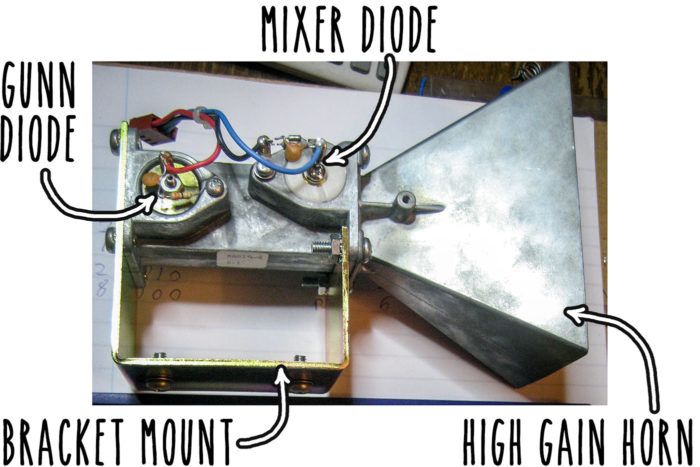
These C&K gunn modules are very good for use in a microwave audio link system and can be used directly with little modification and good audio quality. Other gunn modules known to work well for audio links include, Solfan, Mullard, most C&Ks, pascal, M/A com, MDT. (please let me know if you know of any more)
The basics
A regulated bias voltage of around 8V (or 6-9V depending on the unit) is applied onto the gunn diode which will oscillate at around the 10GHz. The bias voltage is proportional to the oscillating frequency. This is the carrier which we can now modulate with our line level audio signal/audio frequency (AF). The great thing about using microwave is that very few standard/cheap components are needed to send your AF over it sine we are simply just super imposing the audio onto a DC level. Did I tell you these gunn modules can be found on top of traffic lights?… does this look familiar?:
A Microsense traffic light motion sensor
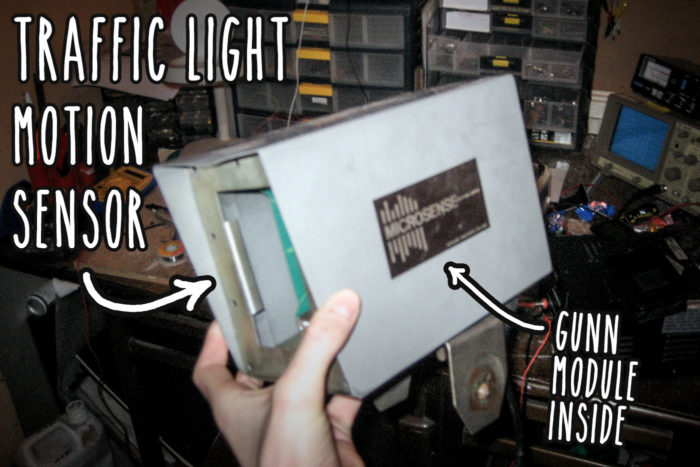
The above picture is a Microsense motion sensor used to sense cars/vehicles that pull up to the traffic lights, these particular units use ‘Alpha’ gunn modules but they are pretty poor for modulating audio onto and tend to sound very tinny and don’t seem to respond too well being modulated with the high audio frequencies. The Alpha gunn that comes out of the Microsense unit is shown below (again, the gunn diode is at the back, to the left):
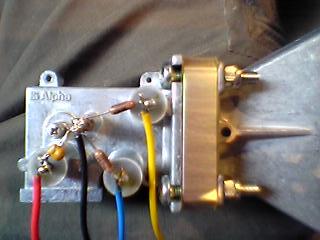
If you are able to obtain surplus traffic light sensors (many get thrown away) it may be worth noting at this point that the gunn modules used in the Siemens sensors work well as part of a microwave link system to send audio down. The Alpha units as shown above do not seem to sound too good with audio but are still good for experimenting with.
Preparing the gun module
Connecting gun diode with the wrong polarity will damage it, and replacement diodes are hard to find. Adding a regular diode across the gun diode is recommended (see pic below) if the gunn module is connected with the wrong polarity it will simply be a short circuit and blow any fuses in that circuit without harming the gunn module. In the picture below i have used a 4001 (common rectifier diode).
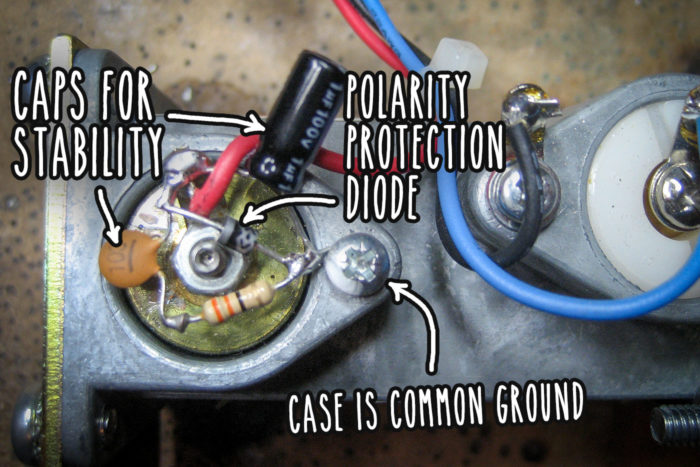
You will notice on the above picture I have added a few components around the gunn diode, this is an attempt to prevent any unwanted parasitic oscillations that may occur. The components are: electrolytic (1uF), ceramic (103= 10000pf) in series with a 33Ohm carbon resistor across the main gunn diode terminal.
Adding a convenient RCA connector
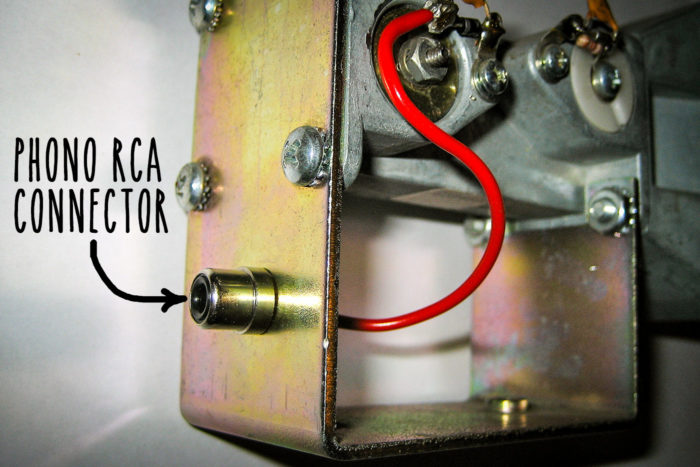
Modulating the carrier – and simple example
All these gunns require to produce microwaves is a DC bias voltage. The diode will oscillate at a different frequency depending on the bias voltage. Below is a basic audio mod circuit and bias supply for a gunn module, the audio is mixed onto the gunn supply resulting in a varying voltage which causes to gunn to vary its frequency (aka frequency modulation or FM). This circuit also has a couple of pots to adjust deviation and gunn/bias voltage:

VR1 adjusts the voltage. VR2 adjusts deviation. This pot can be replaced by a few fixed resistors in series with a 500 Ohm pot for accurate voltage adjust. It’s also best to stick a heatsink on the regulator (7805) as the gunn module will draw quite a bit of power when it heats up.
Testing it out on breadboard
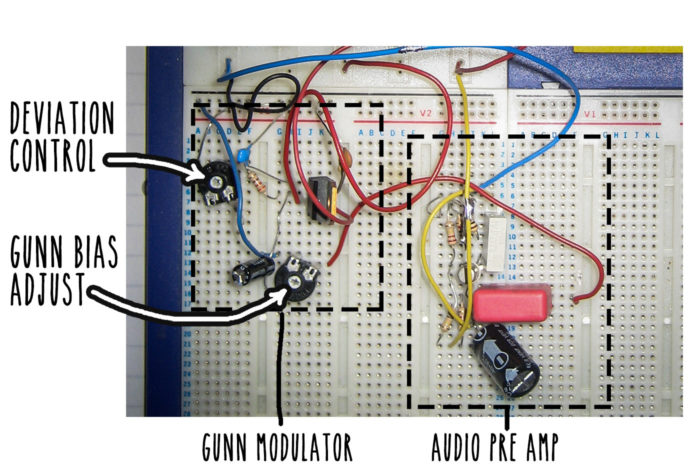
I added an audio stage before the input of the mod circuit for the gunn which also includes pre-emphasis.
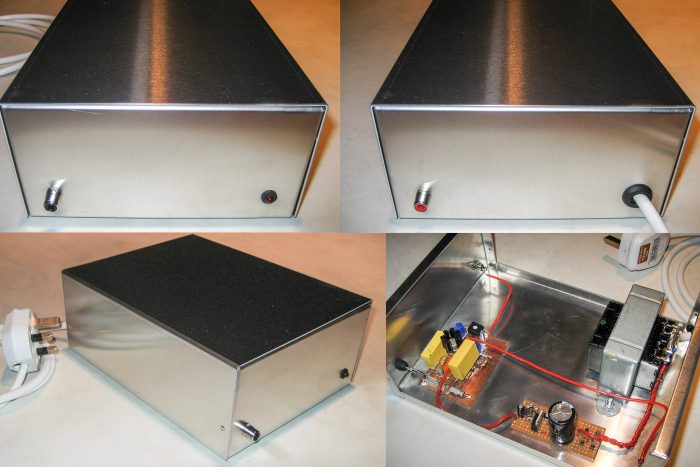
After experimenting a little bit with this I boxed it up with power supply and also added an audio limiter to prevent over modulation….
RDS and a stereo encoding can be also mixed in with the audio at this point
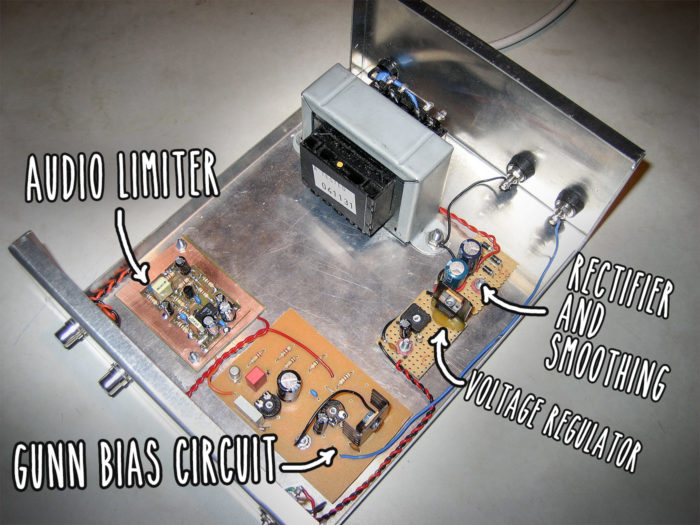
Update – a better circuit
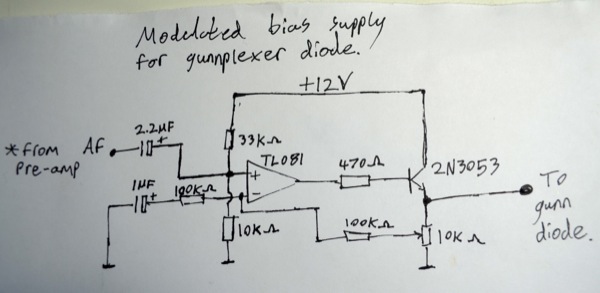
Here is the best circuit I’ve seen for modulating a gunn diode with audio. The first circuit is just a pre-amp and the second is the adjustable DC bias supply.
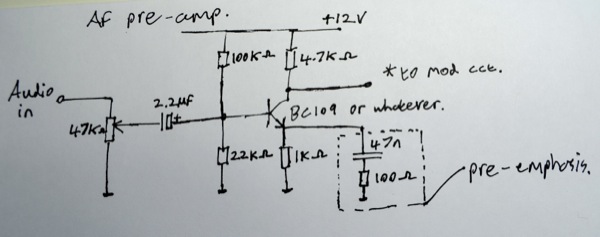
Final product: audio link system gunn diode modulator box… thing
A_Person
What is the polarity of the 1uF electrolytic cap. on the gunn?
James
What are the components you have added to the horn, and what values ?
Mike
Hi James, I’ve just updated that page and added component values and also a much better circuit. Thanks for visiting
Mike Hudson
Hi James, I’ve updated the page with the component values on the gunn
Tony
please send me your link box circuit and audio limiter to my mail. I do not understand where to connect the audio signal and power to the horn.
Thank you, Tony.