

This post goes over how to set up a microwave link system for transmission of audio over distances of up to 10 miles.
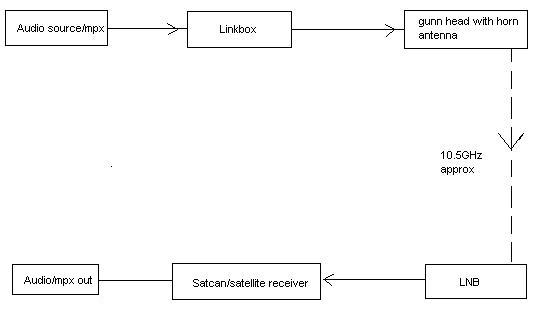
The diagram below shows the basic setup for a microwave audio link.
For the microwave receiver see here: 10GHz X-band Microwave receiver for Audio
For the microwave transmitter see here: 10GHz X-band microwave link transmitter
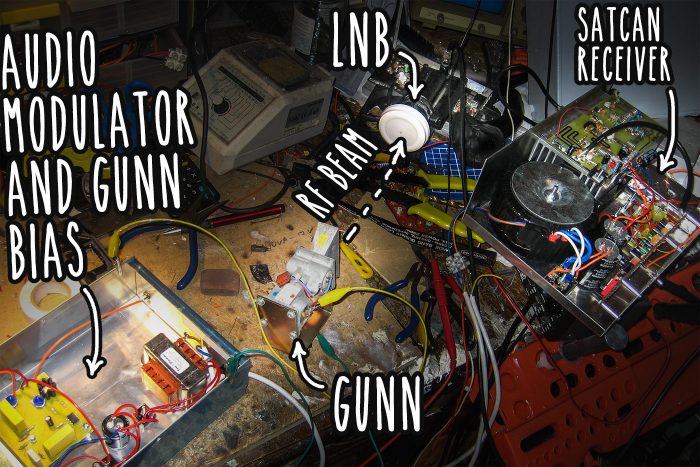
The picture below demonstrates a full microwave link setup on the work bench:
Tuning
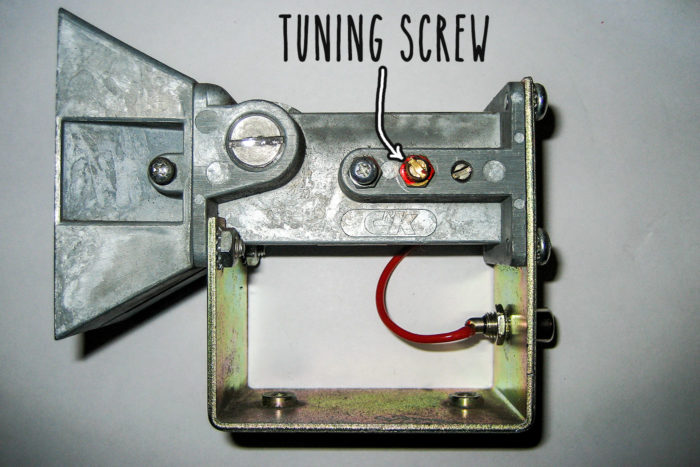
The frequency of a gunn oscillator is mainly set by cavity size. The cavity has usually has a brass screw inserted into the side just in front of the actual gunn diode to adjust the frequency. This screw can be replaced by a PTFE (plastic) screw for easier tuning (usually if you need to retune often) otherwise my advice is set the screw then glue it good!
Setting up the link
OK so you have line of sight (with no obstructions!) from the gunn to the LNB? its time to tune. Set the gunn bias voltage (on the linkbox) to around 8 Volts (suitable for most gunn modules). You may want to experiment with different gunn voltages as it can affect the frequency response of the modulating audio. Solfans and large C&Ks such as the one demonstrated here seem to work best on 7.9-8.5 Volts. I have noticed that with higher gunn voltage, the more the higher audio frequencies become attenuated, resulting in more bottom heavy audio.
With the gunn now running, monitor the audio output of the satcan receiver (you should hear white noise if no link is established). Now turn (very slowly) the brass tuning screw on the gunn until you hear the dead carrier (no white noise). With the carrier signal established, feed the linkbox with some audio and see how it sounds. If you can’t hear the audio, turn the brass screw some m0re – what you thought was the carrier might just be a spurious emission.